

Sidepress: A plugin for Wordpress
Sidepress is a plugin to add news on a Web site using Wordpress as news manager. Without changing anything to the content already present on your site, you can install Wordpress in a subdirectory and display titles and summaries of last posts in a frame on your home page.
The plugin allows you to define the contents of this list of news from the administering panel of Wordpress.
(c) 2008 by Denis Sureau - Licence GPL 2.0
How to install the plugin
The archive contains a demo with a stylesheet and the subdirectory sidepress.
According to the usual procedure for installing Wordpress plugins:
- Copy the directory sidepress of the archive into wp-content/plugins.
- Enter the plugins section of the administering panel of Wordpress.
- Sidepress appears in the list. Activate the plugin.
Now the link sidepress is present in the bar of options.
The options
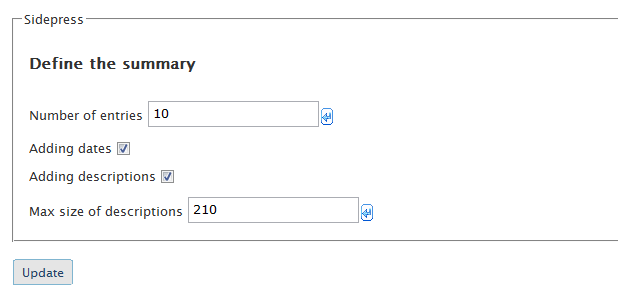
Number of entries: number of news to be displayed in the frame, 10 by default.
Adding dates: display the date of last modification or not.
Adding description: display a summary of the posts or not.
Max size of description: if a summary is displayed, the maximum number of characters.
How to use the demo
The demo page, sidepress-demo.php can be located anywhere on your site, along with the sidepress.css stylesheet.
You must adjust the path depending on your domain name and the directory of the blog.
<?php
  $SIDEPRESS_PATH = "wp-content/plugins/sidepress";
   include("$SIDEPRESS_PATH/sidepress.php");
?>
The path, assigned to the variable $ SIDEPRESS_PATH can be a URL or a relative path. It depends on the subdirectory where Wordpress is installed on your site.
In the same way, to use on your own page Sidepress, put the above code with the path of the plugin on your site.
Path issues
Users sometimes face problems of access for the script sidepress.php from
the demo page.
Use a relative path.
If that does not work, then remove the plugin and put these files in the same directory:
sidepress-demo.php
sidepress.css
sidepress.php
sidepress.ini
path.php
In the demo page, a dot must be assigned to the path variable:
$SIDEPRESS_PATH = ".";
In this case you can not configure the program from Wordpress, you will do it by editing directly the file sidepress.ini with a text editor.
Download
- Download sidepress
- Warning: This script is old and has not been tested recently. Try it on a backup of your site (a local installation for example), before to use it on the production site.
Versions
- 1.0 - First version.
Sidepress makes use of the Anaa Ajax framework for its manager interface.
Problem with Sidepress
milo
scriptol
<?php
  $SIDEPRESS_PATH = "wp-content/plugins/sidepress";
   include("$SIDEPRESS_PATH/sidepress.php");
?>