

Sitemap and generator
The sitemap in XML helps crawlers of search engines and and the HTML version helps users, for guidance as needed on the site.
Now, sitemaps are extended with image and video tags and even a set a tags that turn them into a RSS feed.
You can generate a site map with just a command and edit the generated document
from within the built-in viewer (or any text or XML editor), and then upload
it directly at the root of your site.
Finally you must register the map if the format is XML or text. The XML format
is the standard from Google adopted by Yahoo and Live Search (Microsoft).
- Sitemap concepts.
- How to create the map of a website?
- Why to make a sitemap?
- XML, text or HTML, which format to choose?
- Sitemap formats.
- Sitemap index.
- Multiple contents in one sitemap.
- Tips, important advices about XML, text or HTML site maps.
- Validating the sitemap.xml file.
- Submitting the sitemap.
- The sitemap generator.
- Resources.
Sitemap concepts
How to create the map of a website?
With the graphical interface, you have just to type the name of the home page and click on the "Generate" button!
Why to make a sitemap?
A sitemap, either in the XML or HTML format, helps search engines to index
all pages of a website.
Additionally, Google, when an XML sitemap is registered, produces an analysis
of problems encountered and a report of errors, and statistics.
Google returns which requests to search engines will lead to your pages and
the pages that have not been indexed.
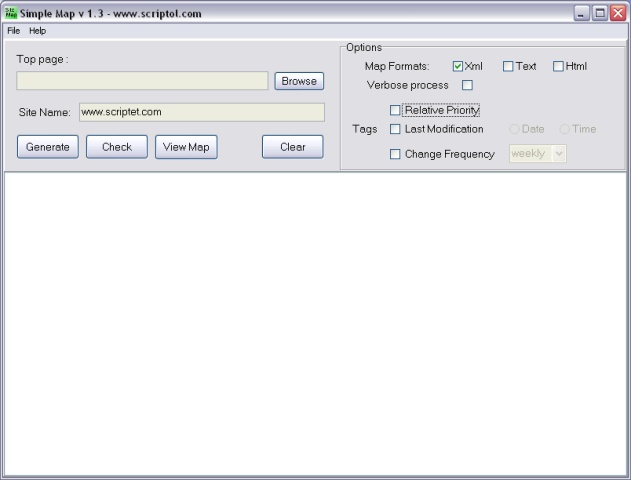
Simple Map, the screen
XML, text or HTML, which format to choose?
The XML format is now recognized by main search engines. It is intended to
give various information to Googlebot and other crawlers. This XML document
is generated by Simple Map according to the standard specification.
- The priority tag indicates which pages are the most important ones.
- The lastmod tag, gives the date of the last modification. Used along
with the frequency attribute.
- The changefreq tag, is the frequency of scanning by the robot, from
always, for a very big website with pages changing continuously, to
yearly or never, for static pages. As for W3C specifications
of formats with a version number.
The text format gives only the list of URL of pages to be indexed. It is accepted by Google.
The HTML format is for visitors of your website. It may display links, titles, descriptions or other infos. It is scanned by search engines and allows to give URL of pages that are not indexed, specially in the case of multi-level sub-directories, since deeper levels are not always scanned
The plain text or HTML files are simple list of URLs, but the XML format is made of tags corresponding to a standard format.
Sitemap formats
XML format
The container is urlset and it holds a set of url tags matching the pages of the site.
<urlset xmlns="https://www.sitemaps.org/index.htmlschemas/sitemap/0.9">
     <url>
        <loc>http://www.example.com/</loc>
        <lastmod>2005-01-01</lastmod>
        <changefreq>monthly</changefreq>
        <priority>0.8</priority>
     </url>
</urlset>
Images in sitemap
To have an image indexed by search engines, the format is as following:
<url>
   <loc>http://example.com/sample.html</loc>
   <image:image>
       <image:loc>http://example.com/image.jpg</image:loc>
   </image:image>
</url>
Videos in sitemap
See the FAQ of video sitemap, by Google.
News sitemap
For your articles to be published on Google News, it must, in addition to the URL containing a unique ID, a specific sitemap. It is the standard XML sitemap with tags added.
In fact these tags are transforming the sitemap in a RSS file:
- <publication> is equivalent to channel. It includes the <name> and <language> tags.
- <access> with value "publication" for free access or "registration" for a limited access.
- <genre>, optional, is used to describe the type of article.
- <publication_date>, date and time of publication.
- <title>, title of the article.
- <keywords> optional.
- plus legacy sitemap tags for URL, weight ...
A News Sitemap should only contain articles published in the last two days.
Sitemap index
A sitemap index is a file holding a list of sitemaps. It allows if you have several maps or if the file is splitted into several file, to give the URLs.
You do not need to create an index if you have only one sitemap file and even if you have multiple sitemaps for different contents, they may be joined in a single file, as explained further.
The index file has a standard XML format too.
The container is sitemapindex and it holds a set of inner sitemap tags.
<sitemapindex xmlns="https://www.sitemaps.org/index.htmlschemas/sitemap/0.9">
     <sitemap>
        <loc>http://www.example.com/sitemap1.xml</loc>
        <lastmod>2004-10-01T18:23:17+00:00</lastmod>
     </sitemap>
</sitemapindex>
Multiple contents in one sitemap
To cope with the proliferation of types of sitemap files, Google has decided to integrate all types of content in a single file.
The multiple file contents looks like this:
<?xml version="1.0" encoding="UTF-8"?>
<urlset xmlns="https://www.sitemaps.org/index.htmlschemas/sitemap/0.9"
        xmlns="https://www.sitemaps.org/index.htmlschemas/sitemap-image/1.1"
        xmlns="https://www.sitemaps.org/index.htmlschemas/sitemap-video/1.1">
  <url>
    <loc>http://www.example.com/mapage.html</loc>
    <image:image>
       <image:loc>http://example.com/image.jpg</image:loc>
    </image:image>
    <video:video>
    <video:content_loc>http://www.example.com/mavideo.flv</video:content_loc>
      <video:title>Look growing the youngest.</video:title>
    </video>
  </url>
</urlset>
Thus three types of tags in the URL tag: loc for a page, image plus image:loc to an image file, and video with video:content_loc.
Important advices about XML, text or HTML sitemaps
XML sitemap
- The XML format is now supported at least by Google, Yahoo and Bing.
- XML sitemaps are required if you use dynamic links for your articles (JavaScript links).
- If some pages in your website are not indexed yet, give these pages a higher priority in the XML sitemap with the "priority" tag.
- To let a page ignored by crawlers of search engines you should use a Robots.txt file or the "ROBOTS" meta tag with value noindex.
- The sitemap is for the whole site. Don't create a map with only links of files that are not indexed by Google.
- The time option (in lastmod tag) is for very big websites! Only date is useful in most cases.
- A sitemap with all pages same higher priority and faster frequency is of null interest for Google. Give to pages the lower priority and the slower frequency if they are already indexed and not frequently changed.
- For videos, a tag has been added to the sitemap protocol.
HTML sitemap
- You may create a HTML map for visitors and an XML map for robots of search engines.
- Put the link to the HTML sitemap on the home page.
- When a page is added to your site, it is not indexed immediately. You have to wait for days or for weeks before it becomes visible. Meanwhile search engine's robots scan your site daily, the database is updated from time to time (weeks or months).
RSS sitemap
- A RSS file is a valid sitemap for Google and other search engines, but
for recent pages only.
Sitemap index
- An index may contain the URLs of 50 000 sitemaps each containing up to 50 000 Web page URLs.
Validating the sitemap.xml file
To validate your XML site map, you need for a validator and two files:
- sitemap.xsd, the schema of the format, included in the archive
- sitemap.xml, the list of web pages, on your website or locally on your computer.
See resources for a validator.
Submitting the sitemap (sitemap.xml)
The XML map file must stays at root of your site, belong the home page, index.html or index.php or other name.
You can submit it in three ways:
- Register at the site of the search engine.
- By a ping request.
- With the robots.txt file.
1) Register through the interface
Create an account in Google's tools for webmaster if you don't have one.
Google will provide you a test file to upload into your website, and once
this is done, you have to return and click on the verify button... and forget
them for a day before to return again for the results.
2) Ping request
You can also submit the sitemap with a ping, see at "What do I do after
I create my Sitemap? " in the FAQ in resources below.
Once the sitemap is registered, when it is updated you don't have to register
it again, you can inform the search engine that the file is modified by a
ping:
https://www.google.com/ping?sitemap=http://www.example.com/sitemap.xmlReplace scriptol.com by the URL of your website, and google.com by the URL provided by the search engine: yahoo, ask, etc.
3) Use the robots.txt file
According to the blog of Google, you can now add a sitemap entry to the robots.txt file, and the sitemap is parsed when the robot of Google and other search engines encounters this file. the syntax is:
User-Agent: *
Disallow:
Sitemap: http://www.example.com/sitemap.xml
The robots.txt file is stored at root of the website along with the sitemap file and the home page, index.html or other.
It is possible for the owner of several websites, to define in the robots.txt file of a site, the URL of sitemaps for each website, one per line. Référence.
User-Agent:*
Disallow:
Sitemap: http://www.example.com/sitemap.xml
Sitemap: http://www.example.fr/sitemap.xml
The sitemap generator
The program parses recursively the content of a website, from the main page
to each page that is linked, and builds a list of all pages to be indexed
by search engines. A list of extensions in the source allow to select the
type of files to index.
The program works locally offline on the image of the site for now. There
is a lot of websites that offer you to build the sitemap of your Internet
site, directly online.
Syntax:
php smap.php [options] site-url local-repository
Example:
php smap.php http://www.example.com c:\example.com
- To see the options, type:
-
php smap.php
- The list of supported extensions and the files to exclude is in the options.php file. You can automatically exclude pages with this meta tag:
-
<meta name="robots" content="noindex">
Setting up
You can adapt the program to your site by changing the variables in options.php file (or option.sol to the source).
- The name of the site map. You can also change it in smap.ini.
- The list of valid extensions.
- The list of files to exclude.
- The list of directories to exclude. You can exclude only files in a folder but not the subdirectory with an asterisk.
By default the program can work with static files on a Wordpress site. The content must then be added to the map of the dynamic site.
Getting the program
- Download the last version of Simple Map
- Licence of SimpleMap: Mozilla 1.1.
- Download the old version with binary executables.
- View the manual for the old version.
Getting the source code
The source code is included in the archive. This is a Scriptol program compiled to PHP 7.
The source of the graphical user interface is furnished free of charge also.
Changes
-
2.0 - 2016 October 13.
Program entirely rewritten to build the map from the content of directories. Requires now a list to file to exclude (or metas robots or unsupported extensions). -
1.7 - 2015 July
Source rewritten in Scriptol 2. -
1.6 - 2009 July
Fixed a compatibilty issue with PHP 5 in the addlink function. For the smap.sol function. The binary is unchanged. -
1.5 - 2008 March
The command line script is now comptatible with PHP 5 and a PHP version is included in the archive now.
Solved problem of files with uppercase letters under Linux.
The algorithm has been entirely rewritten and the source is now easier to read and to modify if needed.
The binary version is unchanged for now. -
1.4 - 2007 May
The IDE is unchanged, it is still 1.3 but the command line program launched is improved.
Now the "robots" meta-tag of Web pages is checked for "noindex" or "none".
The algo has been rewritten to improve processing of sub-directories.
The source can be compiled with the last version of the compiler, this was not the case for the previous one. -
1.3 - 2006 August
The smap.log file was not found. This has been fixed. -
1.2 - 2006 February 24
Now you can generate several kinds of map at once.
Links with Internet protocol are better handled. -
1.1 - 2006 February 23
Tags with empty value are no longer added into elements. -
1.0 - 2006 February 22
First release.
Resources
- Sitemaps.org - Official website of the standard, common to Google and Bing with the full spec.
- Robotstxt.org. More infos about robots.txt and indexing of your website.
- Video Sitemap. Videos can be indexed too.