

HTML 5, the future of the Web
HTML 5 officially will become the format of Web pages to succeed to the current version 4.0. The standard is being defined by the W3C. Since 2004, the independent working group WHATWG id working to define a standard format for web page and to replace both HTML 4 and XHTML, while maintaining compatibility. Its success prompted the W3C to turn away from XHTML 2 on which he barely achieve unanimity and from proposed standards on forms. In fact the HTML format 5 goes much farther than that, as we will see ...
History
The last specification of HTML 4 was published in 1999 and since this date,
the W3C turned to XHTML.
But XHTML 2 causes the discord, in addition to the fact that it is incompatible
with preceding standards, one reproaches it its pure document orientation
whereas the Web becomes 2.0 and needs more and more applications and uses
various media.
From this opposition in 2004, an independent group supported by Apple, Mozilla
and Opera is born, the WHATWG (Web Hypertext Application Technology Working
Group) which undertakes the definition of a successor for HTML.
On March 3, 2007, the W3C announces that it restart
the work on HTML to give it a successor.
The new specification of the W3C has the same author as that of the WHATWG,
Ian Hickson.
Overview
The new format is not any more a simple format of document, but also a support
for current Web applications such as forum, etc and a purpose is to facilitate
interoperability.
It has two formats in one, HTML and XHTML 5, the first with a doctype, the
second with only at the beginning the line <?xml version= ""?>.
It integrates DOM Level 2 for HTML.
Syntax is such as a page can be parsed as an XML document if it is designed
for that, but it keeps incompatible characteristics from HTML, such that the
tags without contents which end by ">" and not "/>" both
being supported by browsers, mais not by XML parsers.
Applications
HTML 5 is aimed at Web pages and Web applications. Moreover the definition
was called Web Application 1.0 before changing name for being better posed
as a successor to HTML 4.
Some applications such as forums, wikis, purchasing systems, searching systems,
e-mail clients, instant messaging clients, discussion software, online document
editing, sites sharing resources, and Web 2.0 sites in general, are now popularized
and require a format of document more adapted to that.
Features of HTML 5 include graphics and images, which will make it possible
to make animated pages, multiplayer online games.
From HTML 4 to HTML 5
Even if the format is still in work, certain components are acquired. It is wise to know them because some practices should be adopted right now, such as suppression of frames.
HTML 5 is compatible with HTML 4 and XHTML although some tags become obsolete. it can take two forms, a traditional one with HTML tags, the other in XML. It comprises new forms, support new media, and adds a support for drawing and images. The new format will integrate another specification in progress: Web Forms 2.0.
New elements
Canvas
It is a background on which one can draw and thus new graphic elements
may be added to the interface. It is inspired by the syntax and functions
from Java.
One can put several canvas in a Web page.
On the canvas one can perform transformations as scaling, rotating, translating.
Varied figures are available: rectangles, Bezier's curves, arc, with functions
of filling and stroke. And also clipping on the edges of the canvas.
Audio and video
The video tag allows to embed a video in the document. It is accompanied
by a src attribute to indicate the file, but also by attributes like start,
stop, autoplay etc which define the behavior of the video.
The audio tag is the equivalent for sound files.
Section
The section tag makes it possible to divide (or subdivide) a document
into semantic parts. They are used to create an outline, table of contents.
The sections can be chapters. They differ from div tag which has a role
of presentation.
A section is completed with a header and a footer.
Modified elements
a, optional href
Removing href makes it possible to use the attributes of a on a dynamic link, in conjunction with onclick but without providing URL (the URL could be defined in a script).
script, the async attribute
A script is by default executed at loading, while it will be executed at the end of parsing of the HTML page when the defer modifier is added. But if it is the async modifier that is present, then it is executed in an asynchronous way, therefore independently of the display of the page and according to the availability of resources, as Ajax.
Removed elements
Frames disappear. Consequently the tags frame, frameset, noframe are not any more part of the format.
The new HTML
HTML 5 is a replacement for the current HTML 4 standard of the W3C.
Its definition is supported by major actors of the
Web, Google, Apple, Mozilla and Opera. Microsoft support it in Internet Explorer 9 the largely most used browser.
The author of the HTML 5 definition became employed of Google.
Google announced Google Gears tool which makes it possible to run Web applications
without connection deprecated and replaced by the equivalent functions in HTML 5.
The interest of Google is to suppress the operating system
and to generalize the use of on line applications to the desktop station, its interest thus is in HTML 5.
HTML 5 vs Silverlight
The Silverlight plugin was Microsoft's solution for online applications. It used the XAML interface language but worked in any browser.
Thanks to the Canvas tag, HTML5 offers all the capabilities of Silverlight. Vector shapes can be drawn and images placed within it. This opens the door to sophisticated interfaces, animations, and games. HTML5's video and audio tags also have Silverlight equivalents, and both environments work with Ajax.
Both HTML5 and Silverlight offer a way for applications to run offline. However, Silverlight allows you to choose the programming language, while Silverlight only supports JavaScript.
In conclusion, the two environments were comparable and differed in their programming style and details. And you don't need a plugin with HTML5.
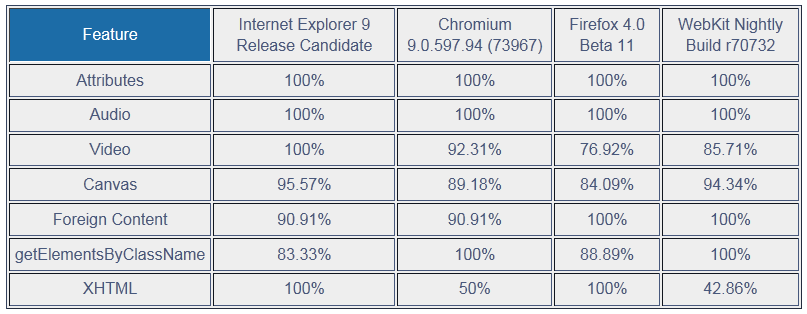
Compatibility of browsers with HTML 5, august 2011, source W3C
For a direct test in you browser:
Conclusion
The failure and limitations of XHTML 2 paved the way for HTML5, which is not only an improvement on HTML4 and XHTML1 but also a response to and an alternative to the Silverlight environment. HTML5 also replaced Flash.
Google has declared its Google Gears tool, which allowed web applications to run offline, obsolete because it has been replaced by equivalent HTML 5 functions.
The W3C began standardizing the new HTML. Most of its features are gradually being implemented by all browsers.
More information
- HTML 5 specification by the WHATWG. Written by Ian Hickson.
- HTML 5 specification by the W3C. The W3C resumes work on HTML starting from the document of the WHATWG. Same author.
- Canvas.
The graphics tag is now implemented in all browsers. Tutorial and examples.