

Chrome, the browser that changed the Web
The Google's Chrome browser, according to its creators, is not intended to take market share, but to change the offer so people can have tools to use the current Web 2.0 made of online applications rather than simple text documents.
Why is Chrome different? Chrome is even more than a browser, it is a strategy. Take an example. New computers equipped with Asus motherboard have the Express Gate feature, it is a smaller version of Linux that starts at the computer boot and displays instantanously a browser. One can thus read its mails immediately, without waiting for the loading of Windows or Linux. For many users, the browser is all they expect from a computer. It is easy to conceive that future lighweight netbooks will include only a browser as Chrome to run the most common Web applications with just the ability to store files.
What Chrome has brought to browsers
Upon its release in 2008, Chrome had many advantages over competing browsers. One must admit today that they have disappeared for the simple reason that all the improvements it has made have been taken over by competitors, including Microsoft' Edge!
Reaction of Steve Ballmer, CEO of Microsoft:
"If you talk to Google they’ll say it's thin client computing but then they’ll issue a new browser that’s basically a big fat operating system designed to compete with Windows but running on top of it."
Reference The register.
Most of the innovations are now implemented in other browser, including Internet Explorer 9 and more again Edge, and are now improvements of the Web.
A refined interface
It allows devote himself entirely to the point, the content of the page, which
is even more helpful for a Web application, such as the online word
processor Google Docs. Having more room for content may be required on a laptop or a netbook.
Omnibox
The address bar is meant to be intelligent, it offers a completion which suggests to Net surfers what remains to type. It is both a search bar and a URL bar, that takes into account the habit of surfers who type directly the name of a site in the search bar rather than the complete URL in the URL bar...
Tabs
They are in Chrome separate applications, you can also drag and drop a page to the desktop to create a different window. This allows to work on two pages at the same time, for example, on GMail to write a letter while a document is consulted.
Slideshow of sites
As on the screenshot on the right, the start page
presents a slide show of sites previously consulted, an idea which
comes from the Opera browser.
JavaScript compiled
We know that Chrome will be joined on this plan by other browsers, the V8 compiler runs the JavaScript code up to 40 times faster. Soon Firefox will be equipped with TraceMonkey and Safari with SquirrelFish.
HTML 5 and WebGL
Some parts of HTML 5 were already implemented in Webkit, including Canvas, the graphics rendering surface, before other browsers. You can use Canvas with Firefox, Chrome, Edge and Safari. The advantage trends to disappear, but WebGL is more advanced.
Private mode
To navigate without a trace, without cookies, without cache. On Chrome it is called Incognito.
Open source
The code is open, it is possible to see what does the browser and that should calm the fears of those who believe that Chrome spy them. This facilitates the development and allows for unofficial versions, some of which operate on Mac and Linux.
PDF reader
A readed embedded to display document in the printable PDF format to get rid of the Adobe's plugin.
Questions about Chrome
Why has Google created Chrome?
There is already a plethora of browsers and competitors are struggling to establish themselves faced with Internet Explorer. But the avowed aim of Google, as expressed in the comic book, is to develop the technology of browsers, to propose something new that will require developers to improve their product too.
Browsers have been designed there is a dozen years while the Web was different. To run the applications of Web 2.0, it must start from scratch and create something completely new.
Why this name, Chrome?
There was no official reason for this choice except that the word evokes elegance.
However we can see that Chrome is the name of the directory of XUL applications and that in the root directory of Mozilla Firefox it contains the main DLL of the browser. This could have inspired the creators of the software.
Microsoft has in the past drawn up plans for a multimedia system named as a first step Chrome, then Chromeffect. The project was then merged with DirectX.
What means the Chrome logo?
The Chrome logo evokes a bit of Firefox with the Google colors and precise boundaries of a Poké Ball, which gives the combination below:
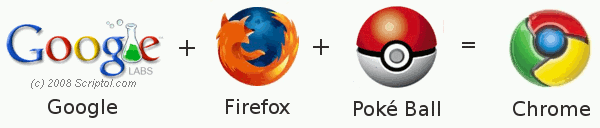
These are perhaps only similarities. Here is another explanation that makes sens since the release of Google Chrome OS:
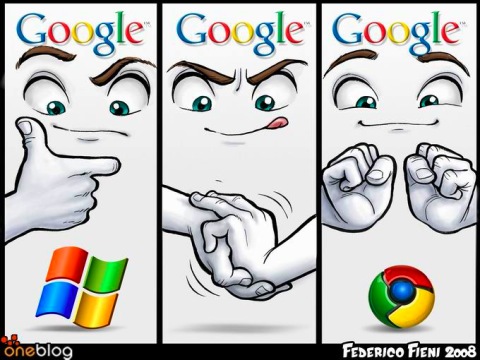
The chrome logo has changed in March 2011. Old logo. New logo.
Where can I get the keyboard shortcuts?
Some essential shortcuts:
- F12: Opens the development window.
- CTRL + O: Load a local file.
- CTRL + SHIFT + N: Go incognito in a new window.
- CTRL + SHIFT + T: Display again a tab that was closed. With a sequence, you can redisplay ten tabs after closing the browser
What is the user agent?
The user agent is the header that identifies the source of a request (for access to the site) and that is reflected in the statistics.
It is similar to that of Mozilla:
Mozilla/5.0 (Windows; U; Windows NT 6.0; en-US) AppleWebKit/525.13 (KHTML, like Gecko) Chrome/0.2.149.27 Safari/525.13
The numbers 0.2.149.27 and 525.13 are version numbers (the browser and Webkit versions) and will change with each new edition of the browser.
The AppleWebkit term refers to the version of the rendering engine, borrowed from Safari and Konqueror.
Versions of the browser
New features in each version since the first. Evolution of speed.
About:Plugins
Command in the url field.