

Asynchronous JavaScript + XML
A programming technique to update dynamically the pages of a website.
Ajax is a term coined by Jesse James Garrett and that became popular since the publication of the article Ajax: A New Approach to Web applications, published on 18 February 2005, is a shortcut for: « Asynchronous JavaScript + XML ».
Since the publication of this article, the use of techniques that make up Ajax and the XMLHttpRequest object in particular has become widespread among webmasters. W3C moreover defined a formal specification: XMLHttpRequest.
Another term that also became popular is Web 2.0, whose Ajax is the basis, that designates collaborative sites or use of programming techniques to provide user interaction.
Ajax has two main benefits:
Dynamic pages: The combination of HTML and JavaScript to create dynamic pages, whose appearance and content can change in interaction with the user.
For example clicking on a button could display hidden data or change their order.
With asynchronous communication only the part of the page that is modified is redisplayed.
Web applications: The role of Ajax in web applications is in the interaction with the server to read the files and saving information that is almost as easily as on the hard disk of the desktop.
The normal behavior of Internet that involves sending pages to the browser is completely changed by the use of Ajax.
Ajax has become commonplace with its integration in HTML 5 and JavaScript frameworks, and in fact, the interest of developers has moved to HTML 5 for its new tags and APIs that accompany it. Among these, WebSocket appears as the successor to Ajax, because it is a superior means of communication between an application and the server or the backend.
What is Ajax practically?
Ajax is a combination of standard technologies:
- The HTML or XHTML language for the code of the pages, and CSS for the presentation.
- DOM (Document Object Model) to access elements of the page and have a dynamic display.
- XML or JSON or plain text for exchanging data with the server and manipulation of data.
- The XMLHttpRequest object for asynchronous request to the server from the browser. It exchanges text or XML data through the GET or POST methods.
- JavaScript to bind together anything.
The XMLHttpRequest object can retrieve data or send data to a script on the server, synchronously or asynchronously, according to the schema below:
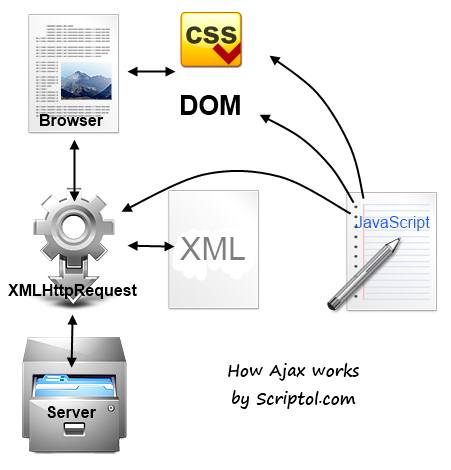
The web page includes the DOM, the document structure, and the presentation is defined by CSS. It interacts with the server through the XHR object. It exchanges XML or text content. The operation work with JavaScript code that accesses the tag of the page throught the DOM.
Synchronous vs asynchronous
The principle of the asynchronous mode is that the server sends the data as a measure of queries that the browser and takes them into account when they arrive without interrupting other tasks and therefore without suspending the display of the page.
The immediate effect is that the page can be modified after being partially displayed.
The asynchronous operation can be surprising to the programmer. Commands do not run in sequence but depend upon server responses, the result of instructions in a script can occur after the results of instructions that follow them...
How to let Ajax work?
Ajax is used by
defining JavaScript functions to use the XMLHttpRequest objects' methods and attributes, or simply
by installing a framework that defines the most common tasks.
These frameworks include a JavaScript code
that runs client side and possibly also code in another programming language
that runs server side.
The role of the XHR object is to send requests to the server with the send function. The HTTP methods GET and POST as well as others, determine the nature of the request: GET to receive data, POST to send (and receive the result). The HEAD method gives information on the nature of a file on the server.
The XHR object can receive text files, assigned to the responseText attribute, or XML assigned to responseXML. In the second case we can access the content directly with DOM methods.
There is no responseHTML attribute (the Anaa framework can emulate it).
The XMLHttpRequest 2 specification takes into account Ajax requests between different domains.
The exchange of data between the client and the server is done as explained in the Ajax Tutorial, that provides examples.
Using a framework
One can use a JavaScript framework integrating Ajax, which enables to get data from the server sending data to a script more easily.
- jQuery is a pure JavaScript framework, it adds widgets and special effects. It is distributed in separate code files which are included if needed, that preserves the lightness of the page.
- Mootools is another popular Ajax framework.
The trend is to HTML 5 frameworks providing lots of function to make an app, and including Ajax. They works often on mobiles and on the desktop.
Evolution of Ajax
Should the word Ajax be restricted solely to the definition that was given by JJ Garrett in 2005 or can we use the term about new technologies intended to create dynamic web pages?
In fact, from the outset, the definition was too
restrictive because XML is far from being the single or
preferential format to exchange data with a server.
Howewer there are quantities of technologies to achieve
modern web applications which must be
distinguished from Ajax.
Therefore it
is better to be clear to involve only the word to use XMLHttpRequest in
combination with the technologies for dynamic pages listed above, and with any data format for the exchange with the
server.
We can consider that Ajax in the future will designate any mode of asynchronous
communication and updating dynamic pages, even if it is based on a different
object replacing XHR, but this object must work on all browsers because Ajax
is founded in principle on standards.
Ajax is actually surpassed technologically by new protocols as WebSocket which enables bidirectional communication (the server can send data itself) and WebRTC that goes further by providing real-time communication. But that does not mean that Ajax is useless in practice: very often it is more than enough to improve the user experience of an online application that depends on user actions.
A comparison of XMLHttpRequest and WebSocket is given in an article which explains how to use the XHR object and WebSocket, and the advantage of bidirectional exchanges over simple asynchronous protocol.