

JSON to exchange objects between different languages
JSON (JavaScript Object Notation) is a format for data exchange between the browser and the server. Its syntax is similar to an associative array in JavaScript. Actually, the format defined in 2002 was based on a subset of the language spec, ECMA-262.
Since PHP 5.2, the JSON extension is part of the default PHP installation. It offers he function json_decode and json_encode which respectively convert a string to an object or an object to a string, the string form allowing to store the object in a file or transmit it to a JavaScript application.
All modern browsers support the JSON object, used to convert an object or display it as a tree of strings.
JSON even is now a data type in PostgreSQL and MySQL (5.5.7). For these free competitors to Oracle, JSON content can be a data type just like INTEGER or TEXT. New commands are added to use it. Result of a query may be expressed in JSON too.
The JSON format recognizes the same types of data as JavaScript:
- Number, String, Boolean, and null are primitives that can be assigned to a key that must be a string.
- Array is a list of key-values in square brackets.
- Object is a list of key-values in braces.
How to use JSON in JavaScript
A JSON file is read on the server through a parser. A parser exists for most common programming languages.
In a web page, simply give the contents of the file as an argument to the eval() function to return an array or an object directly usable by JavaScript.
var x = eval('(' + xhr.responseText + ')'); For example, the content assigned to the responseText attribute of the XMLHttpRequest object in an Ajax request can become an object in a program.
Before assigning an object in JavaScript with the eval function, it is recommended to purge the content with a regular expression to avoid a possible injection of malicious code.
var doc = xhr.responseText;
var obj = !(/[^,:{}\[\]0-9.\-+Eaeflnr-u \n\r\t]/.
   test( doc.replace(/"(\\.|[^"\\])*"/g, ''))) && eval('(' + doc + ')');
This code was given in RFC 4627.
There are JSON parsers for all languages running on the server side, it is so possible to exchange objects between a JavaScript application and the backend, for example, if it as a PHP script:
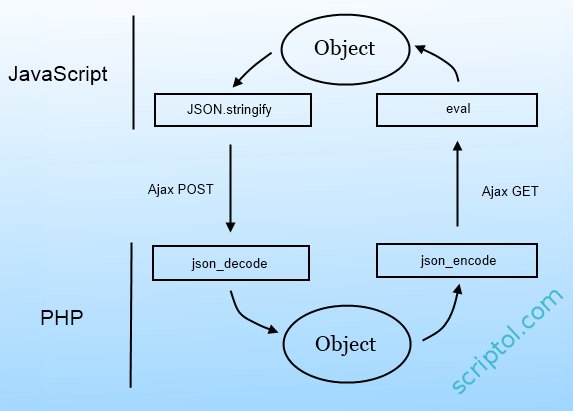
We should now replace eval by JSON.parse, that is now supported by all browsers.
JSON vs XML and other alternative formats
Here is an example of an object that contains an array. Numerical values are stored as is, while the strings are always quoted.
The JSON file:
{
   "menu": "Files",
   "commands":
   [
    {
     "title": "New",
     "action":"create"
    },
    {
     "title": "Open",
     "action": "open"
    },
    {
     "title": "Quit",
     "action": "exit"
    }
   ]
}
This file is the representation of a menu, the article cited below provides a demonstration of its use.
The XML representation:
<menu label="Files">
  <menulist>
    <command label="New" command="create" />
    <command label="Open"  command="open"/>
    <command label="Quit"  command="exit" />
  </menulist>
</menu>
The XML version is easier to read, but for the computer, the advantage is to JSON: lighter, easier to parse, similar to a JavaScript object.
For a more details comparison, see JSON or XML which format to choose?
Data validation can be done using JSON Schema. This will avoid having to change platform, as did Uber, on the grounds that data receveid do not always have the expected format.
Other formats include YAML, more comprehensive but also more complex and Protocol Buffers created by Google for its servers. The latter fits better in languages other than JavaScript because, from a prototype that describes the data (that would be lines of menu in our example), the compiler creates classes in C or Java to access the data. But it is better for static data.
References: More information on Json.org. The site provides a link to a parser for each programming language. See also the ECMA specification.