

Qt, portable framework for desktop and mobiles
A graphical interface for desktop and mobile that we can even found in facades of a virtual set in 3D!
 Qt (cute) is a multi-platform (including Linux, Windows, Android and iOS) graphics library for the development of GUI, graphic user interface.
It provides graphical interface components, the widgets, and others component for databases access to, XML processing, a system files API.
Qt (cute) is a multi-platform (including Linux, Windows, Android and iOS) graphics library for the development of GUI, graphic user interface.
It provides graphical interface components, the widgets, and others component for databases access to, XML processing, a system files API.
A development tool, Qt Creator if offered for free to develop Qt applications.
Major applications using Qt are the KDE Linux environment, the Opera browser (under Linux), VLC, Google Earth, Skype.
The version 5 integrates the V8 compiler. The trend is to use C++ for creating module while JavaScript is the language of the interface.
With the version 5.4 the WebKit rendering engine becomes obsolete, replaced by WebEngine based on Chromium. With WebChannel, JavaScript and native code can communicate and objects created in C++ can be used in an HTML application. WebSocket is also supported.
A Qt widget may be superimposed in a 3D scene, as seen in the WolfenQt demonstration video.
By reusing the classical algorithm of the Wolfenstein 3D game, embedded in the scene is a widget to display any application on the walls of the maze.
The fast display is obtained by mixing the OpenGL graphics library and the Qt code.
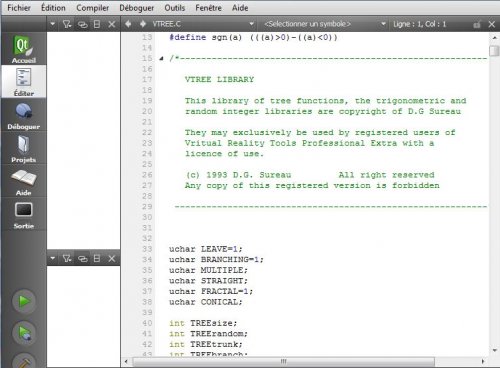
Qt Creator is a specialized IDE for Qt apps
Qt was developed by the Trolltech company, acquired in 2008 by Nokia. Trolltech becomes then Qt Software. In August 2012, Nokia sold Qt to the Finnish company Digia that has the focus to port it on all platforms including Android and Windows 8. In 2014, Digia decided to create a separate company dedicated entirely to Qt.
Qt and JavaScript
Can we make Qt program in JavaScript? We do not talk to use JavaScript in combination with Qt components as does Qt Quick but to write programs in JavaScript. This would allow to use a scripting language, that you know well if you are a webmaster, on the desktop with a GUI ...
This is the purpose of the module node-qt that works with Node.js. This platform allows the use of JavaScript from the command line, and the module integrates Qt in the platform.
To use it you must:
- Install Node.js.
- Install node-qt, with the command: npm install node-qt.
- Include the module in the script with this statement:
var qt = require('node-qt'); - Create an application with:
var app = new qt.QApplication;
- Create a window with:
- You can then add content to the window with the method:
window.paintEvent(function() { ... }
var window = new qt.QWidget;
All this is done with a simple text editor.
For more details, see node-qt on Github. Of course integration in Node allows different programs to communicate, the Qt interface can coexist with HTML pages, PHP scripts, as shown in the JavaScript section of this site.
Qt and mobile phones
Nokia developed Qt Quick for mobiles and tablets, a framework providing components to create interfaces. This lighter version is suitable for touch screens. It incorporates the QML language, a version of JavaScript, a runtime to access the system. The programmer may use it with Qt Creator.
After the announcement of the partnership between Nokia and Microsoft, and the choice of Windows 7 Phone as preferential system for smartphones, developers were worried about the future of Qt.
Nokia confirmed, however, support for Qt that runs on Symbian and Meego, and wanted to expand it by hiring new developers, but in 2012, it parted completely from the platform in favor of Digia.. After Meego replaced by Tizen, whose the preferred interface is HTML 5, Qt is even more marginalized on mobile. However, the interface being now compatible with Android and iOS (since version 5.1), it is possible to develop in Qt on mobile next to the standard platform.
Knowing that Qt uses JavaScript for the interface and embeds the V8 compiler, its interest seems to be limited on mobile where you can use Node in combination with HTML 5 to obtain a complete user interface (see the JavaScript section on this site).
Now we can run Qt applications on Android, iOS, Blackberry and it is the framework of native applications under the Sailfish and Ubuntu Touch OS. The application off Sailfish however will have a large size.
A special package is offered in 2014 for making apps on Android, with a commercial license and all the tools included. Actually Qt is only really usable on mobile with this license that provides a QML compiler.
See also
References & resources
- Qt.io. The new site for the open source and commercial versions. Qt Creator is included in the archive.
- Qt for Android. For applications running both on mobiles and on the desktop.
- Razor-Qt. Lightweight alternative to KDE, a Qt-based desktop environment for Linux. This will not only satisfy those disappointed by KDE, it is also a solution to use a tablet as a desktop computer.
- Emscriptem-qt. Tool to compile Qt apps into JavaScript so they can work in a browser. They are so much slower.
- Meteor and Qt. By combining Qt for the native look and Meteor for interacting with Web users, you can build native-like but portable apps.