

XUL, language for building graphical interfaces
XUL is a graphical user interface language derivative of XML for standalone
applications. It is a portable, working on any operating system with the Gecko runtime, or XULRunner, but
is rather difficult to use.
XUL means for "XML-based User interface Language" and was
created by Mozilla in 1999.
XUL seemed destined to become a universal language for describing graphical interfaces. But Microsoft has created his own version, XAML. In addition, the developers have never sought to share the development with third-party tools, which resulted in a plethora of user interfaces languages based on XML. Finally HTML 5, thanks to Canvas, multimedia tags, and frameworks able to extend HTML with new tag, has become a valid alternative.
In 2014, XUL seems confined to Firefox and Mozilla tools and the XULRunner runtime to create application interfaces with the language is unmaintained and developers are thinking to abandon it completely, or more precisely, to use Firefox as a backend application instead.
Conversely, Microsoft XAML (a copy) is more relevant than ever on Windows and Mono.
In 2023 XUL was completely removed from the interface of Firefox which now uses the same components for its interface as those of web pages, therefore based on CSS.
Here is a graphical representation of the components for running XUL:
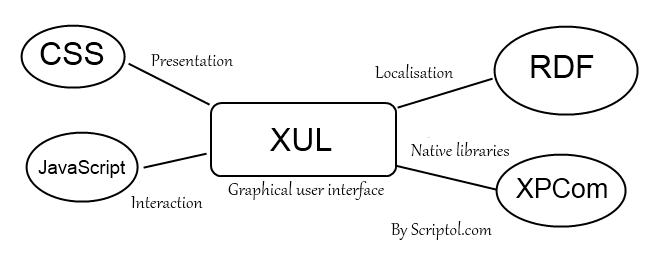
Based on web standards, but complex
The use of RDF, XBL and XPCom in particular makes it a tool difficult to master. XUL is characterized by:
- The code is interpreted.
- JavaScript code may be embedded into XUL to define functions called by events.
- Uses bitmap graphics.
- Events (a mouse click for example) are properties of tags and tags are components of the interface.
- Style properties are defined inside standard CSS files.
- Component (mainly the "widgets", graphical components) may be define by user, in XBL or XPF files.
- The RDF format is user to store and deliver texts, for localization for example.
- XPCom is used for the wrapper between XUL and libraries written in various programming languages.
- It is possible to include HTML code in XUL and then run locally on XULRunner a Web application.
Sample code...
Displaying "Hello world!":
<?xml version="1.0">
<windows width="600 height="480">
  <description>
    Hello World!
  </description>
</windows>
Drawing a button:
<button label="Close" oncommm:solcom and="window.close()" />
To use XUL, first download the XULRunner runtime. Against all expectations, new versions have appeared in January and February 2014.
You can find documentation on Mozilla. A manual on xul.fr/tutorial/ with practical examples and source code.
Explains in detail how to install a XUL application.
Electron is an alternative to XULRunner for building local applications based on JavaScript with XML and CSS for the interface.
See also XAML, Microsoft's version of XUL.