

XAML, language for building graphical user interfaces
XAML eases to create, edit and reuse graphical user interfaces for desktop
and Web applications.
It was to Windows what XUL was to Firefox, FXML to JavaFX, but while XUL tends to disappear, XAML is spreading on all systems since .NET became open source and portable.
It is even possible to use XAML in a Web page with the Granular framework that implements the WPF backend.
XAML means for "Extensible Application Markup Language", and is a XML format
dedicated for graphical user interface. Actually the meaning changed over time, the code name of WPF, "Avalon", was once a part of the acronym.
It
is a Microsoft product which seem to have got inspiration from Mozilla's XUL and the renderer requires the .NET environment on Seven and WinRT on Windows 8.
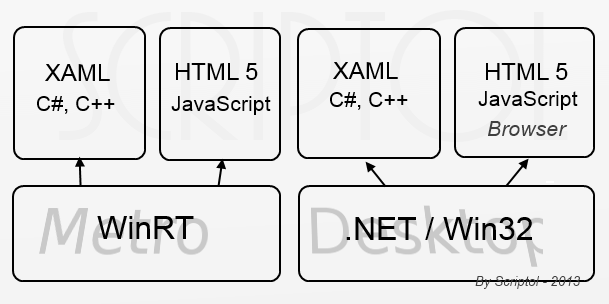
This schema shows XAML on Windows 8.
Both on the legacy desktop GUI throught .NET, and on the Modern UI for immersive apps.
Microsoft has created a plugin for browsers designed as an alternative to Flash, Silverlight, which allows you to use XAML on any browser. However, its development was abandoned because HTML 5 with the canvas tag and augmented with SVG provides the essential features of Silverlight, which makes the latter now superfluous. XAML remains an alternative to HTML 5 for immersive applications on Windows 8.
Originally designed to create applications on the WPF platform of Vista, XAML did not really fit in Windows before the version 8. It actually has the ability to describe a user interface much more easily than HTML, but it is limited to applications specific to Windows while HTML is a universal standard.
XAML describes objects of the interface with their presentation
It is easier to write apps with XAML than with XUL or any other markup language using CSS, because presentation properties are attributs of the tags. But they will be then harder to modify or to use alternate look and feels.
Here are the other features:
- The XAML code is compiled to intermediate code.
- Tags and properties of XAML have a direct counterpart in the .NET library as embedded classes and attributes.
- Uses vectorial graphical images.
- Ability to use .NET classes from XAML.
- Ability to embed C# code into XAML with the "code" tag or to use JavaScript. (XUL, HTML use JavaScript).
- Events (as mouse clic) are properties of tags, and tags are widgets.
Two examples of XAML code...
Displaying "Hello world!":
<Page xmlns="">
  <TextBlock>
     Hello, World!
  </TextBlock>
</Page>
Drawing a button:
<button
   Background="Gray"
   FontSize="18pt"
   Click="OnClick">
    Submit
</button>
See also this Comparison of XAML and HTML 5, and also with the main graphical user interface languages.
The Avalonia framework, inspired by WFP, works with .NET on all systems and uses XAML as the interface language.